HOME   CONTACT    Legal&Privacy    LINKS  


 Products List
  Sketch Master
  Photo to Sketch
  Easy Backup
  Virsual CD Manager
  Others
    Private Room
    Delphi to C++
    PC Watcher
    Text Savior
    Chinese Culture Win

photo to sketch,freehand water color

pc watcher,surveillance

developer tool,delphi code to c++ builder code


Protect folder and files password, easily safely!

Private Room v2.1 (It's free)
Zoom in

Let you own a private data-space which you can take along with you. And,
You can open it on any PC at any time!
Keep you private information secret ,
Transfer data safely and conveniently . and It's freeware,it is free for home and personal user.


In the realistic living, you maybe own a private drawer, that's your secret.
Now, you could own your private room on PC. When you leave the computer, it can prevent your private data to be stolen by anybody.
And, you can take it along with you.


Logo
Name
Version
Platforms
Size(MB)
Download
Purchase
Private Room
2.1
Windows 95/98/ME/NT/2000/XP
1.19

Let you own a private room (data-space) which you can take along with you!

Open your private room on any PC at any time!

The functions:

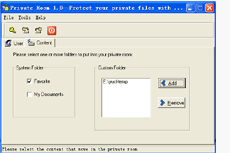
Create user:
Create a user name belong to you.
You can protect your private files on your PC.

Private file include :
My Documents,
Favorite,
and folders you created.

Use Private Room:
Login with your USER NAME and PASSWORD, open your Private Room, your private data will appear on your PC.

Encrypt data:
Logout and close your Private Room, your private files will be encrypted and saved, the PC will comeback, like you didn’t use it.

Export data:
Output your private files into the folder you selected, the private files become a encrypted package and with a tool that you can use it open your Private Room on another PC.
A tool to open your Private Room on any PC is PRT.EXE, it’s in the folder you Exported data.

Import data:
Input your encrypted pack(Private Room’s data) on your PC.

Create new user:
Create a new user name belong you or other person who use the same PC. Login with the new user name, the files belong the new user name is protected and wouldn’t impact another user name.

The bound protected:
My Documents,
Favorite,
and folders you selected.

Attention:
Please don't stop the application facilely, and must logout after you finish operations.
Please don't add very large data into your private room.
If you have any questions about Photo to Sketch, do not hesitate to contact Developers.
Support at: support.htm We'll be happy to help.


Download Purchase Support
 
©Thinker Software. 2005 All rights reserved.